Cook well. Know the cost.
Plateflow is the recipe app that works out the macros and the cost per serve of everything you cook.
Coming soon
Plateflow for iPhone.
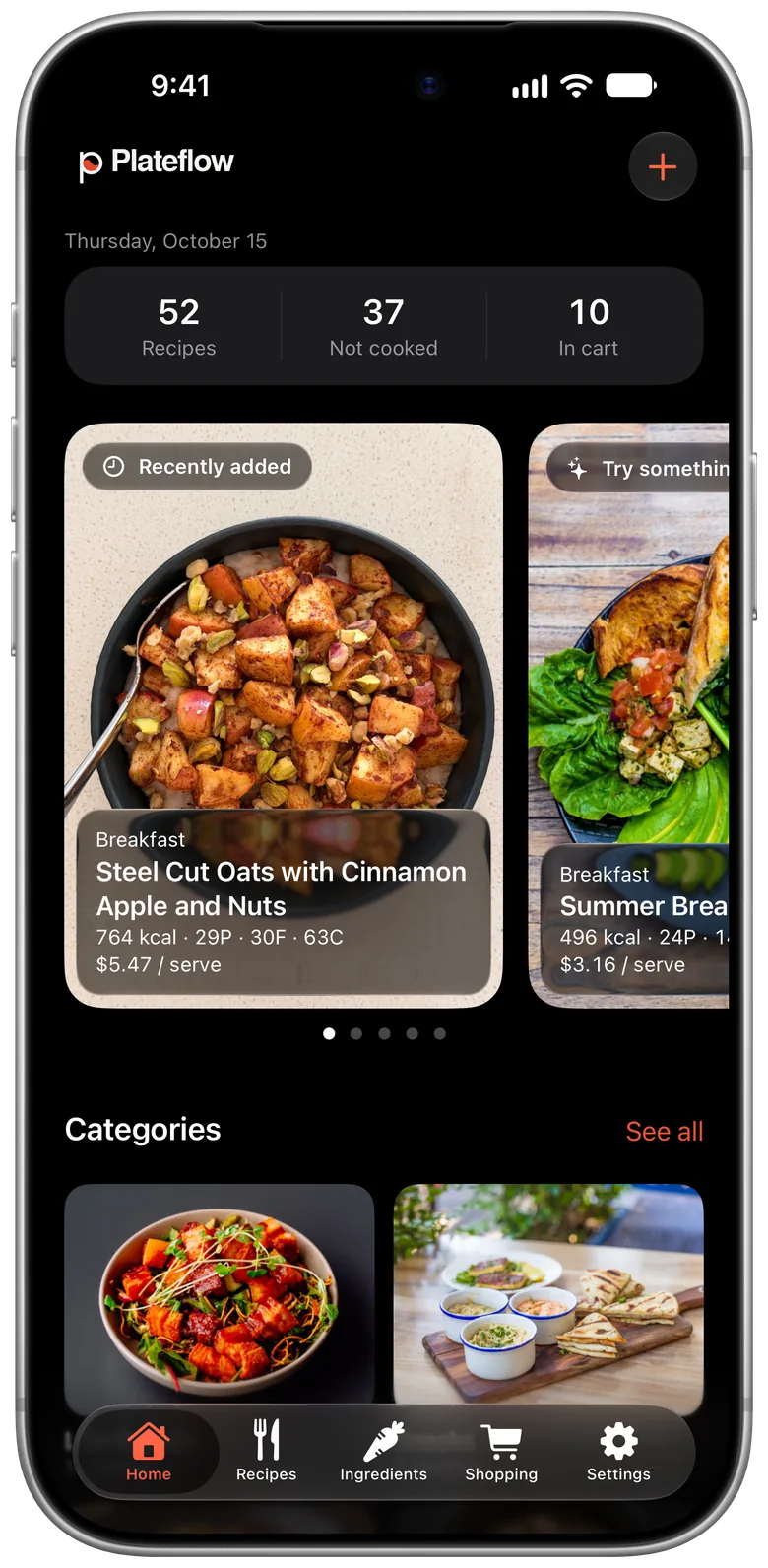
From recipe to shopping list.
Five screens, shown in light or dark to match your device.
-
Home
Your recipe count, what you have not cooked yet and what is in your cart, with each recipe’s macros and price per serve.
-
Recipes
Sort recipes into categories and browse them as a photo grid.
-
Recipe
Calories, protein, fat and carbs, and a price per serve, worked out from your own ingredients.
-
Ingredients
Nutrition and price for everything in your kitchen.
-
Shopping
One list, grouped by category, with an estimated total. Prices are estimates and a guide only.


How it works
-
Add a recipe
Write it yourself or import one. Plateflow sorts the ingredients and the method.
-
See the numbers
Calories, protein, fat, carbs and cost per serve, worked out from your own ingredients.
-
Shop and cook
Send what you need to one shopping list, grouped by category, with an estimated total.
Know what every meal costs.
Plateflow adds up your ingredients to give you a price per serve and a total for the meal. Scan a receipt or a price tag and it matches the prices to your ingredients.
$5.47 per serve
- 764 kcal
- 29 g protein
- 30 g fat
- 63 g carbs
Prices are estimates to guide you, not live store prices. They come from your own entries, receipt scans, open price data from Open Prices and anonymous prices shared by Plateflow users who opt in.
Plateflow for iPhone Duo.
Unfold it and Plateflow uses the whole display, in landscape or portrait: browse every category, open a recipe beside its ingredients, or work down the shopping list.


Features
-
Macros on every recipe
Calories, protein, fat and carbs, always free.
-
Recipes inside recipes
Use your own peanut butter as an ingredient, with its own macros and cost.
-
One shopping list
Grouped by category, with an estimated total.
-
Your ingredient library
Nutrition and price for everything in your kitchen.
-
Price tracking
Scan a receipt or a price tag and Plateflow matches the prices to your ingredients.
Premium
-
Browse by category
Sort recipes into categories and browse them as a photo grid.
-
Shared cookbook
Share recipes with up to 5 people in your household.
Premium, coming soon
-
Syncs with iCloud
Your recipes follow you across your devices.
-
Built for iPhone
Native design that looks right in light and dark.
Privacy and your data.
The short version. For everything else, read the full policy.
-
Your recipes live on your device and sync through iCloud.
-
No ads and no third-party analytics.
-
AI features ask before anything is sent for processing.
-
Sharing prices with Plateflow is optional, and you can turn it off at any time in Settings.
Free to use. Premium when you want more.
Free
- Recipes, ingredients and categories
- Calories and macros on every recipe
- Shopping list
- Add your own prices
Premium
7‑day free trial
Monthly and annual plans. The price is shown in the app before you subscribe.
Everything in Free, plus:
- AI recipe import
- Receipt and price-tag scanning
- Price tracking
- Recipe sharing Coming soon
- A shared cookbook for up to 5 people Coming soon
- A daily macro timeline Coming soon
Subscriptions are billed through your Apple Account. To avoid the next charge, cancel in your Apple Account settings at least 24 hours before a trial or billing period ends.
FAQ
Do I need a subscription?
No. The app is fully usable for free. Premium adds AI features, price tracking and sharing.
Where do prices come from?
From you, and from shared data. Add them by hand, or scan a receipt or a price tag. Estimates also draw on open price data from Open Prices and on anonymous prices shared by other Plateflow users who opt in. They are estimates, not live store prices.
Which devices does it run on?
Plateflow is made for iPhone.
Is my data private?
Your recipes are stored on your device and synced through iCloud. The Privacy Policy has the details.
How do I cancel?
Open the subscription settings in your Apple Account and cancel at least 24 hours before your trial or billing period ends. You keep access until the end of the period you have paid for.
How do I get help?
Email [email protected].
Coming soon to iPhone.
Coming soon